The field of landscape architecture is highly demanding in terms of graphical representation, as it plays a crucial role in conveying complex design ideas and spatial narratives. Designers must visually communicate not only the functional and aesthetic aspects of a project but also its environmental and experiential qualities. This challenge becomes even more intricate due to the varying scales of projects, which range from small private gardens to expansive regional masterplans.
Beyond scale, landscape architects must accurately represent multiple layers of information, including strategic vision, conceptual frameworks, spatial experiences, vegetation character, and construction details. Each of these elements requires a distinct approach to visualization, ensuring clarity and precision in both design development and client communication.
Given this high demand for rapid yet detailed visual representation, designers often find themselves at a crossroads—torn between the tactile expressiveness of hand-rendering techniques and the efficiency and precision of digital tools.
HAND RENDERING FOR LANDSCAPE REPRESENTATIONS
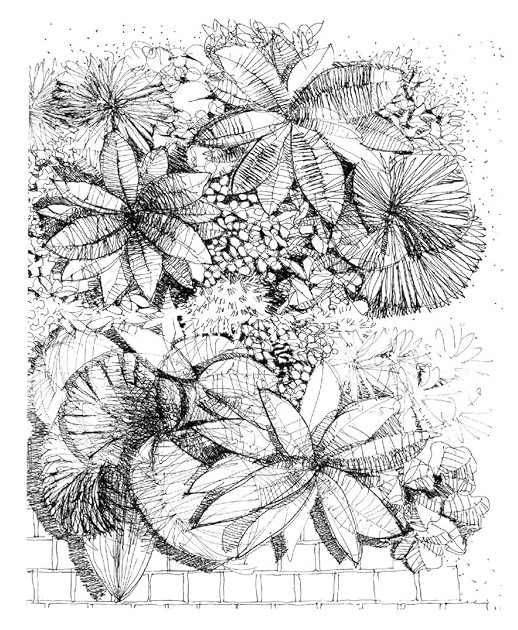
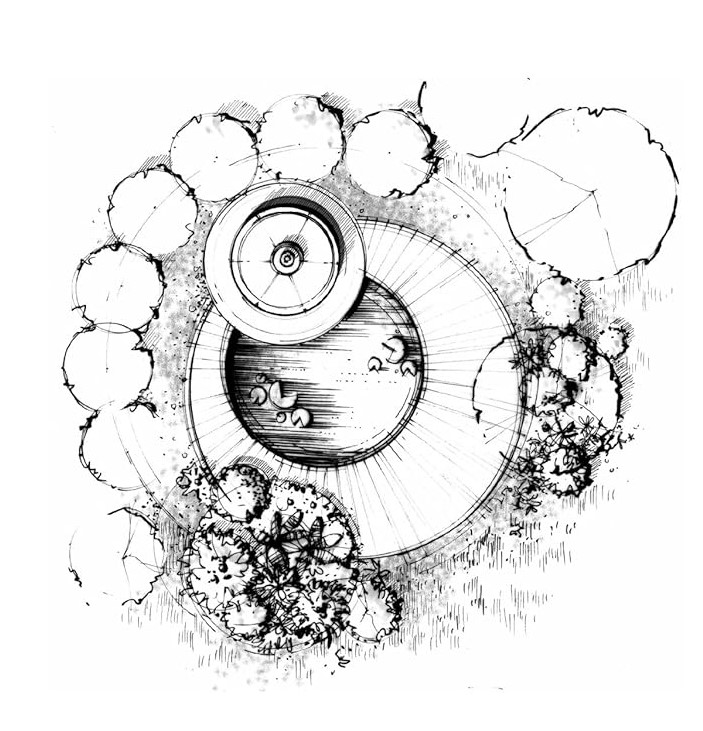
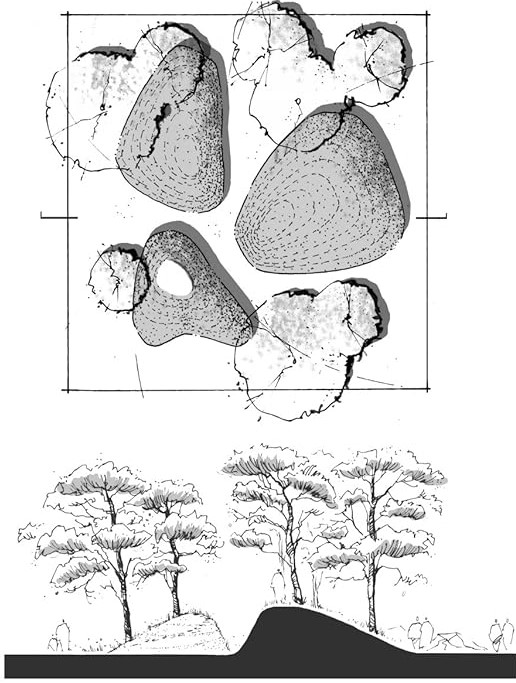
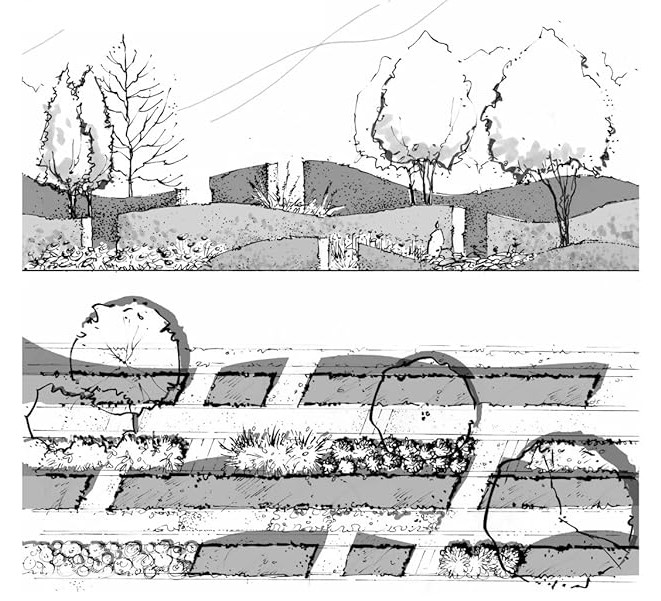
Fig. 01 – Fig. 04 showcase intricately rendered landscape designs that precisely capture the character of the space. This highlights why hand rendering is often the preferred choice when representing landscape character. The ability to work with a variety of mediums—such as pencils, charcoal, pen, and paint—offers architects complete control over strokes, allowing for nuanced depictions of texture, depth, and atmosphere. This artistic freedom makes hand rendering a deeply rewarding tool for any designer.
DRAWBACKS OF UTILIZING HAND RENDERING TECHNIQUES
However, hand rendering also comes with certain drawbacks. While rendering a small-scale project can be a gratifying experience, applying the same technique to large-scale projects can become challenging. Every stroke is permanently etched on paper, making revisions difficult and time-consuming. Additionally, hand-rendered drawings must be scanned, processed, and integrated into presentations—an extra step that requires both time and additional costs.
Beyond integration challenges, hand rendering presents other practical limitations. For example, repeating elements requires redrawing them from scratch, as there is no option to copy and paste. This can be particularly taxing when deadlines are approaching and time is a scarce resource. As a result, despite the undeniable beauty and artistic quality of hand renderings, their adoption and application remain constrained by these practical limitations.
USE OF DIGITAL MEDIA FOR LANDSCAPE REPRESENTATIONS
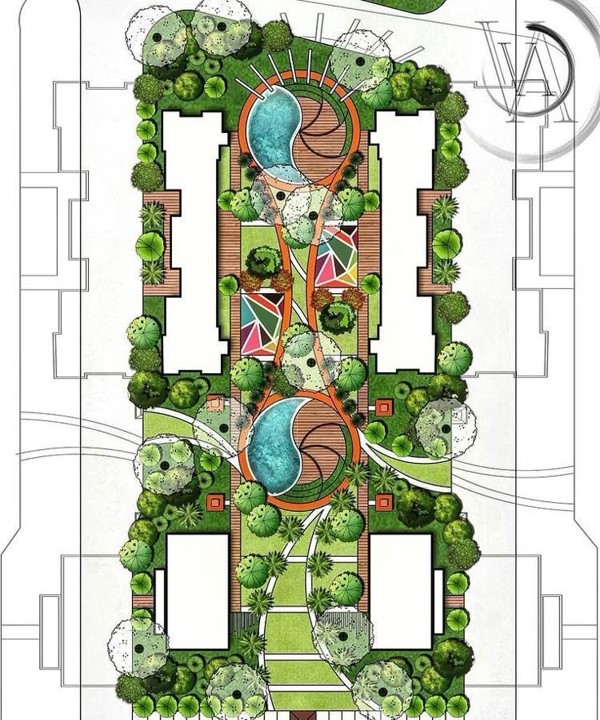
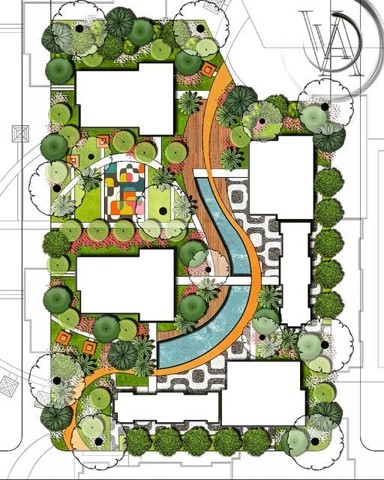
To overcome the constraints of hand rendering in representing large-scale landscape designs, digital media has become the preferred choice. Fig. 05 and Fig. 06 indicate examples of digitally rendered landscape masterplans. One of its key advantages is the ability to duplicate objects effortlessly using copy-paste commands, significantly reducing the time required for graphical representation. This feature is particularly beneficial in large-scale projects where repetitive elements, such as trees, paving patterns, and urban furniture, need to be consistently applied across the design.
Moreover, digital media allows for seamless revisions-a crucial advantage in the iterative design process. When modifications are required, specific portions of the layout can be easily adjusted without affecting the rest of the composition. This level of precision and flexibility is unattainable with hand-rendered drawings, where any alteration often necessitates redrawing significant portions of the design.
DRAWBACKS OF UTILIZING DIGITAL MEDIA FOR LANDSCAPE REPRESENTATION
Despite these advantages, one major limitation of digital media remains its inability to replicate the expressive, organic quality of hand-drawn strokes. Unlike traditional rendering techniques, where an architect can manipulate pressure, texture, and shading to convey the unique character of a landscape, digital tools often lack the spontaneity and tactile control necessary for such nuanced representation.
Thus, while digital rendering excels in efficiency, scalability, and ease of modification, it remains challenged by the artistic limitations that come with replicating the natural variations and character of landscape elements. This ongoing trade-off often leads designers to adopt a hybrid approach, combining both hand and digital techniques to leverage the strengths of each medium.
DIGITAL HAND SKETCHING: THE BEST OF BOTH WORLDS
With advancements in technology, the limitations of digital media in accurately representing landscape character—once a major drawback compared to hand rendering are now easily overcome by specialized digital sketching applications. Applications such as Procreate, Autodesk Sketchbook, Concepts, Adobe Fresco, Krita, Affinity Designer, and Corel Painter provide architects with the ability to replicate traditional hand-rendering techniques with remarkable accuracy.
When used on a touchscreen device with a stylus, these apps allow designers to draw with the same fluidity, pressure sensitivity, and precision as they would with traditional mediums like pencils, charcoal, or ink. The extensive range of brush libraries mimics real-world textures, enabling users to replicate the depth, softness, and character of hand-drawn strokes. This development has effectively bridged the gap between digital and traditional rendering, making digital sketching an equally expressive tool for landscape architects.
ADVANTAGES OF DIGITAL SKETCHING APPS IN LANDSCAPE REPRESENTATION
Apps like Procreate, Adobe Fresco, Autodesk Sketchbook and Corel Painter offer highly customizable brushes that replicate the grain, pressure, and opacity of real pencils, markers, and paints. This allows designers to capture the nuances of vegetation, topography, and textures with precision. In addition to the best of both worlds, digital sketching has the following advantages:
Multiple Rendering Styles in One Platform
Unlike physical media, which requires different tools for different effects, digital sketching apps provide a variety of brushes and styles—pencil, ink, watercolor, pastel, and more—all in one interface. This versatility enhances creativity and flexibility in visual representation.
Clean and Mess-Free Workflow
Unlike traditional mediums, which often involve ink spills, smudges, and the need for drying time, digital sketching provides a clean and efficient workflow. There’s no risk of staining hands, papers, or workspaces, making it ideal for quick iterations and professional presentations without worrying about accidental damage to the artwork.
Instant Color and Material Adjustments
With traditional rendering, changing colors or adjusting shading requires either repainting an area or starting over. Digital tools allow for real-time modifications—hue shifts, opacity changes, and texture overlays can be applied instantly without affecting the rest of the composition. This flexibility enables architects to experiment with different styles and color palettes without fear of making irreversible mistakes.
Ease of Duplication and Revisions
Digital media eliminates one of the biggest constraints of hand rendering: the difficulty of making revisions. Elements such as trees, paving patterns, or shading can be duplicated, resized, or adjusted without redrawing the entire composition. Apps like Concepts allow infinite canvas scaling, making it easy to edit large-scale masterplans without loss of detail.
Layering and Non-Destructive Editing
Unlike traditional hand rendering, where every stroke is permanent, digital tools offer layers that allow users to adjust, erase, and modify specific elements without affecting the entire drawing. This is especially useful for complex landscape plans where different layers may represent vegetation, water bodies, structures, or pathways.
Seamless Integration with Other Digital Tools
Sketching apps can easily export drawings to software like Adobe Photoshop, AutoCAD, SketchUp, or Rhino, enabling a smooth transition between conceptual sketches and detailed technical drawings or 3D models. This integration streamlines the design workflow.
Enhanced Speed and Efficiency
Digital rendering speeds up the design process, particularly for large-scale projects. Apps like Affinity Designer and Sketchbook provide vector and raster-based tools that help create scalable, high-resolution renderings without losing quality.
Portability and Accessibility
With apps available on tablets and mobile devices, landscape architects can sketch anywhere—whether on-site, during client meetings, or while traveling. The ability to carry an entire digital studio in a lightweight device is a significant advantage over traditional sketchbooks and rendering materials.
Unlimited Canvas and Storage
Digital apps remove the physical constraints of paper size and availability. Whether working on a small detail or a large masterplan, architects can zoom in for precision or scale up their designs effortlessly. Additionally, cloud storage and digital backups prevent the risk of losing or damaging original work, which is a common concern with hand-drawn sketches.
Eco-Friendly and Cost-Effective
By eliminating the need for physical materials, digital sketching reduces paper waste and the consumption of art supplies, making it a more sustainable choice. It also saves costs in the long run, as architects do not need to repeatedly purchase pens, paints, and paper.
CONCLUSION
As digital tools continue to evolve, the gap between hand-rendered and digitally rendered illustrations is steadily narrowing. The combination of pressure-sensitive styluses, AI-powered brush simulations, and advanced layering systems now allows landscape architects to achieve the same level of artistry, expressiveness, and precision as traditional hand rendering—while also overcoming its limitations. The future of landscape architectural representation lies in the integration of these digital sketching tools, ensuring both efficiency and artistic depth in design visualization.
 Terrain Tapestry
Leave a comment